

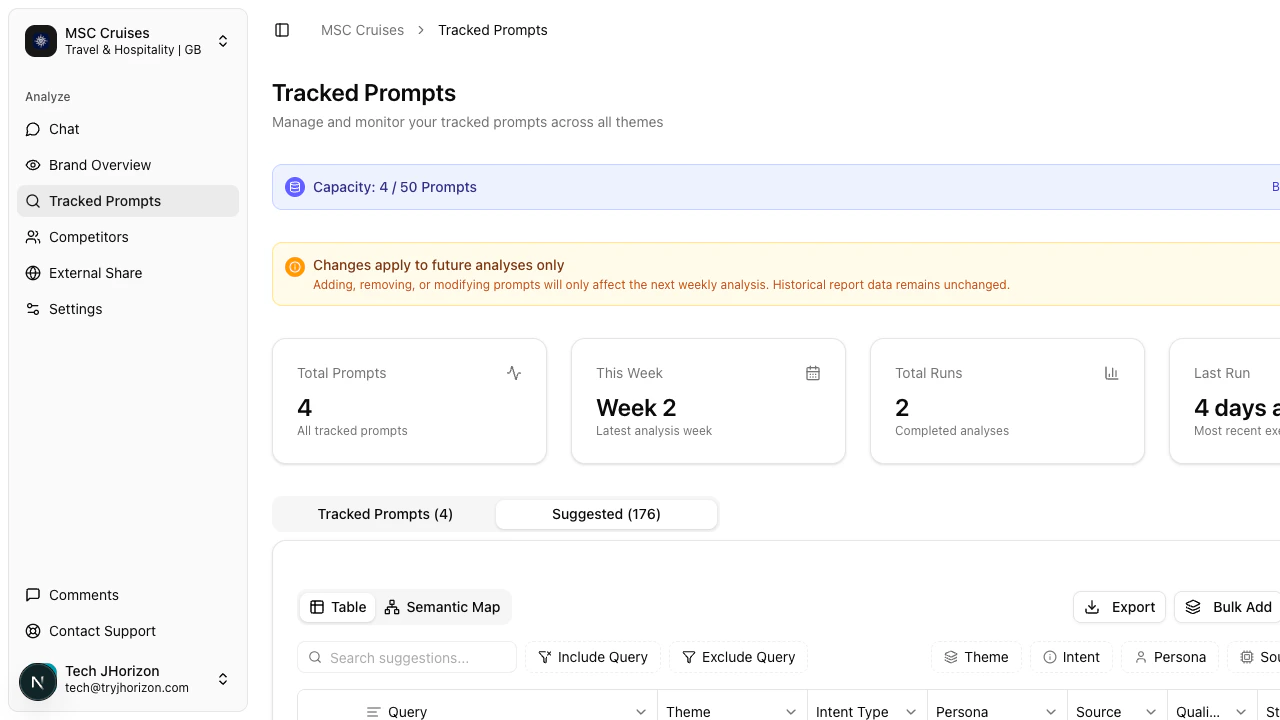
Browse suggestions
Switch to the Suggested tab on the tracked prompts page to view AI-recommended prompts. The tab header shows the total count of available suggestions (for example, “Suggested (176)”). Suggestions are displayed in a table with the same filter options available on the tracked prompts tab:- Theme — filter by topic category (e.g., product features, pricing, comparisons)
- Intent — filter by query intent (e.g., informational, comparison, transactional)
- Persona — filter by target audience or buyer persona
- Source — filter by the AI platform where the query originates
Add suggested prompts
Click a suggested prompt to add it to your tracked list. The prompt begins appearing in future analysis runs once added. To add several prompts at once, select the prompts you want and use the Bulk Add button. This is faster when you identify a cluster of relevant suggestions from the same theme or intent.Adding suggested prompts counts toward your prompt capacity limit. Check your capacity bar before adding prompts in bulk.
How suggestions are generated
J-Horizon builds your suggestion list by analyzing several data sources:- Brand profile — your brand name, industry, keywords, and value proposition inform which topics are relevant to your business.
- Competitor analysis — J-Horizon examines your competitors and the prompts associated with their brands to surface queries where you should also have visibility.
- Coverage gaps — the system identifies themes, intents, and persona segments that your current tracked prompts do not cover, then generates suggestions that fill those gaps.
- Industry query patterns — J-Horizon draws from real query patterns that users search for on AI platforms within your industry, so suggestions reflect actual user behavior rather than generic keywords.
Choosing which suggestions to add
Not every suggestion needs to be tracked. Use these guidelines to prioritize:1
Cover missing themes
Look at the Theme filter to find topic categories that have no or few prompts in your tracked list. Adding prompts from underrepresented themes gives you broader coverage.
2
Diversify intent types
If most of your tracked prompts are informational, add suggestions with comparison, how-to, or review intents. Different intent types reveal how AI platforms respond to different kinds of user questions about your brand.
3
Match your personas
Filter suggestions by Persona and prioritize prompts that align with your highest-value customer segments. These prompts reflect the queries your target buyers are most likely to ask.
4
Check your capacity
Review your capacity bar at the top of the tracked prompts page before adding prompts. Each plan has a fixed prompt limit, and adding suggestions reduces your remaining capacity.
How suggestions update
Suggested prompts refresh automatically based on changes to your account. The main triggers for a refresh include:- Brand profile updates — editing your brand name, industry, keywords, or value proposition causes J-Horizon to re-evaluate which prompts are relevant.
- Tracked prompt changes — adding or removing tracked prompts shifts the coverage gap analysis, which changes what gets suggested.
- New competitor data — as J-Horizon collects more data about your competitors and their AI visibility, new suggestion opportunities surface.
- Analysis results — after each analysis run, J-Horizon incorporates the results to refine suggestions toward prompts that are more likely to produce useful insights.
Related pages
- Manage prompts — include, exclude, and export prompts
- Tracked prompts overview — view all tracked prompts
- Limits and quotas — plan-specific prompt capacity and rate limits