

Navigating to competitor profiles
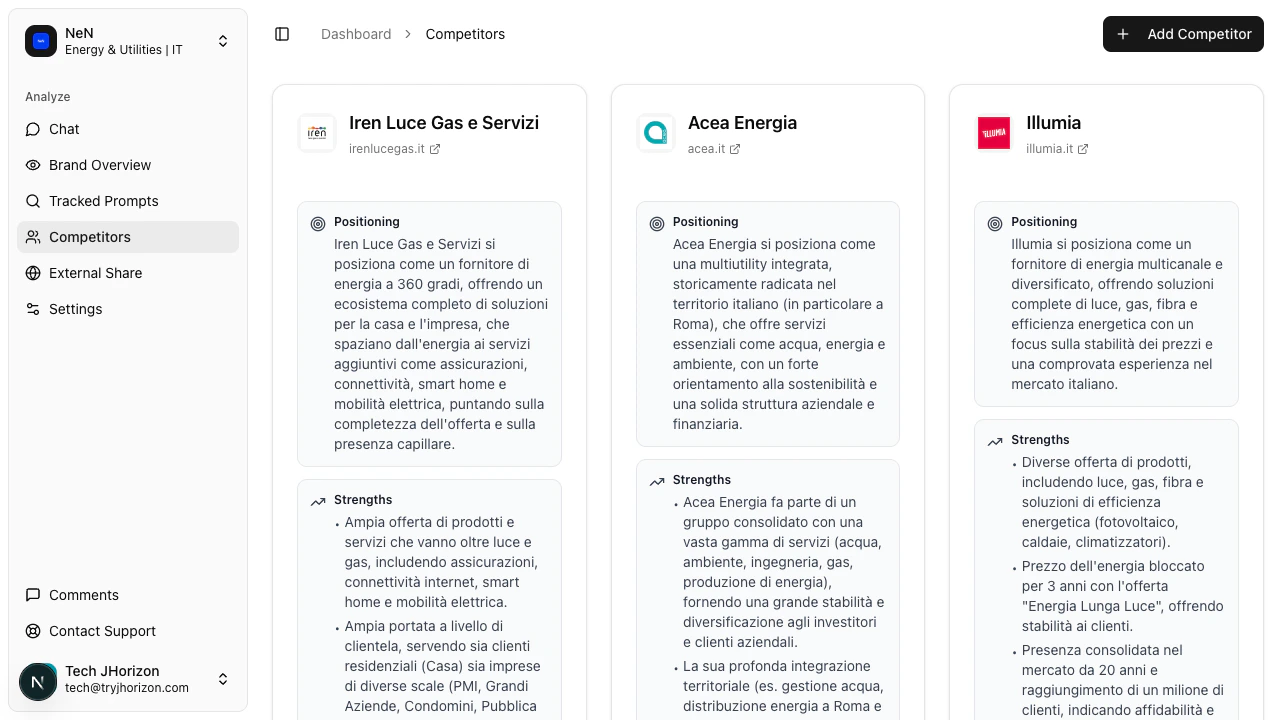
Go to/product/{orgId}/competitors to view all tracked competitors for the selected organization. The page displays one card per competitor, each populated with data from your most recent analysis run.
What each profile card shows
Every competitor card includes the following details:Understanding positioning
The Positioning field on each competitor card is a summary of how AI search engines describe and frame the competitor in their responses. This is not a self-reported tagline or marketing copy from the competitor’s own website. It reflects the actual language AI engines use when discussing that brand across your tracked prompts. J-Horizon generates positioning summaries by analyzing responses from AI search engines (such as ChatGPT, Perplexity, and Gemini) to the prompts you track. When these engines mention a competitor, J-Horizon extracts how they characterize the brand — what category they place it in, what role they assign it, and how they distinguish it from alternatives. Positioning summaries update each time a new analysis run completes. If an AI engine shifts how it describes a competitor — for example, from “budget alternative” to “enterprise-grade platform” — the positioning field reflects that change after the next run. Reviewing positioning over time helps you understand how competitor perception evolves in AI-generated responses.Understanding strengths
The Strengths field captures the recurring positive attributes that AI search engines associate with a competitor. These are not pulled from the competitor’s marketing materials. They represent what AI engines consistently highlight as advantages when recommending or describing the brand. J-Horizon identifies strengths by looking for patterns across AI responses to your tracked prompts. If multiple AI engines repeatedly mention that a competitor has “strong integrations” or “fast onboarding,” those themes surface as strengths on the profile card. Strengths are directly tied to your tracked prompts and visibility data. A competitor may have different strengths depending on which prompts trigger their mentions. This means the strengths you see are relevant to your specific market context, not generic brand attributes.Using competitor intelligence
Competitor profiles give you actionable data you can use to improve your own AI visibility. Here are practical ways to use this information:- Identify differentiation gaps. Compare positioning statements across competitors. If multiple competitors are positioned similarly, look for angles where your brand can stand out in AI responses.
- Find missing strengths. If a competitor has strengths that your brand lacks in AI responses, that signals an area where AI engines do not associate those attributes with you. This is a concrete input for updating your messaging.
- Update your brand profile. Use competitor positioning and strengths as a reference when refining your own brand profile. Strengthening the attributes AI engines already associate with your competitors can help close visibility gaps.
- Cross-reference with dashboard metrics. The competitor profiles show qualitative intelligence (positioning, strengths), while the Competitor comparison tab shows quantitative metrics (visibility scores, mention rates, market share). Use both together for a complete picture.
Language settings
Profile content is displayed in your organization’s configured target language. If your organization is set to Italian, for example, the positioning and strengths text appears in Italian. This matters because J-Horizon runs its analysis in the target language you configure. AI search engines return different responses depending on the language of the query, and competitor positioning can vary across languages. The profiles reflect how competitors are perceived in the specific language market you are tracking, not a translation of English-language results.Managing competitors
Each competitor card has a three-dot menu that allows you to edit or delete the competitor. Editing lets you update the competitor’s name or website URL. Deleting removes the competitor and its associated intelligence data from your organization. To add new competitors, see Add competitors.Related pages
Add competitors
Add new competitors to track in your organization.
Competitor comparison
View visibility scores and market share metrics across competitors.
Brand profile
Configure your brand identity and attributes for AI visibility tracking.