

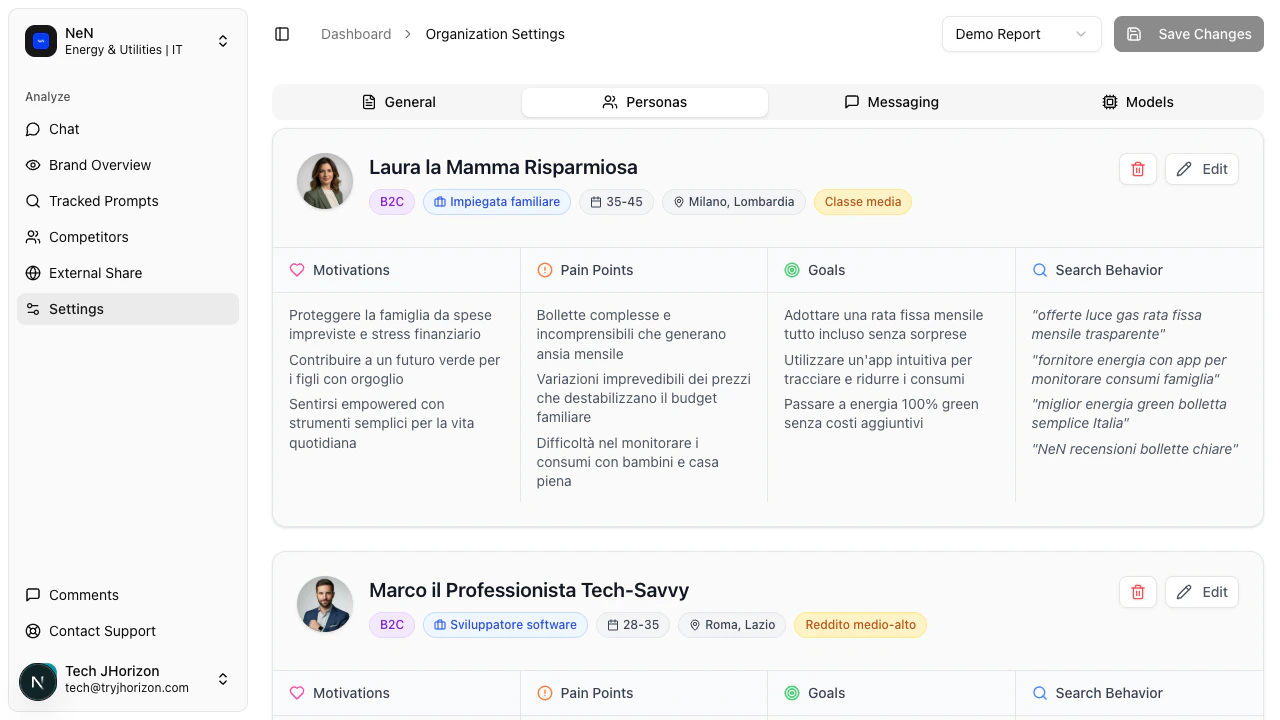
What personas do
Each persona represents a distinct customer segment. J-Horizon uses persona data to analyze whether AI search engine responses align with the needs, goals, and search behavior of your target audiences. This surfaces insights that a single, generic analysis would miss.Persona fields
Each persona card contains the following fields:Create a persona
1
Open the Personas tab
Navigate to your organization’s Settings and select the Personas tab.
2
Add a new persona
Click Add Persona. A new persona card appears with empty fields.
3
Fill in the persona details
Complete each field with information about this customer segment. Be specific — the more detailed your persona data, the more targeted your visibility analysis becomes.
4
Save the persona
Click Save to store the persona. It takes effect on the next analysis run.
Edit or delete a persona
To edit a persona, select it from the Personas tab, update the fields, and save your changes. To delete a persona, open the persona card and click Delete.Best practices
- Define at least 2-3 personas that represent your primary customer segments
- Base personas on real customer data rather than assumptions
- Review personas quarterly as your target audience evolves
- Use the Persona filter on the dashboard to see how each segment experiences your brand differently
Related pages
- Brand messaging — Define pain points on the Messaging tab (same settings page)
- Filters and tools — Use persona filters on the dashboard
- Brand profile — Edit your brand details, keywords, and variations