> ## Documentation Index
> Fetch the complete documentation index at: https://knowledge.tryjhorizon.com/llms.txt
> Use this file to discover all available pages before exploring further.
# Organizations overview
> Understand how organizations represent brands tracked across AI search engines in J-Horizon.
An organization in J-Horizon represents a single brand that you monitor across AI search engines. Each organization tracks how one brand appears in responses from ChatGPT, Claude, Gemini, Perplexity, and other AI platforms.
 ## Company and organization hierarchy
Your company is the top-level account in J-Horizon. A company contains one or more organizations, where each organization represents a different brand you want to track.
For example, a holding company with three product lines would create three separate organizations — one for each brand. Each organization has its own dashboard, tracked prompts, competitors, and visibility data.
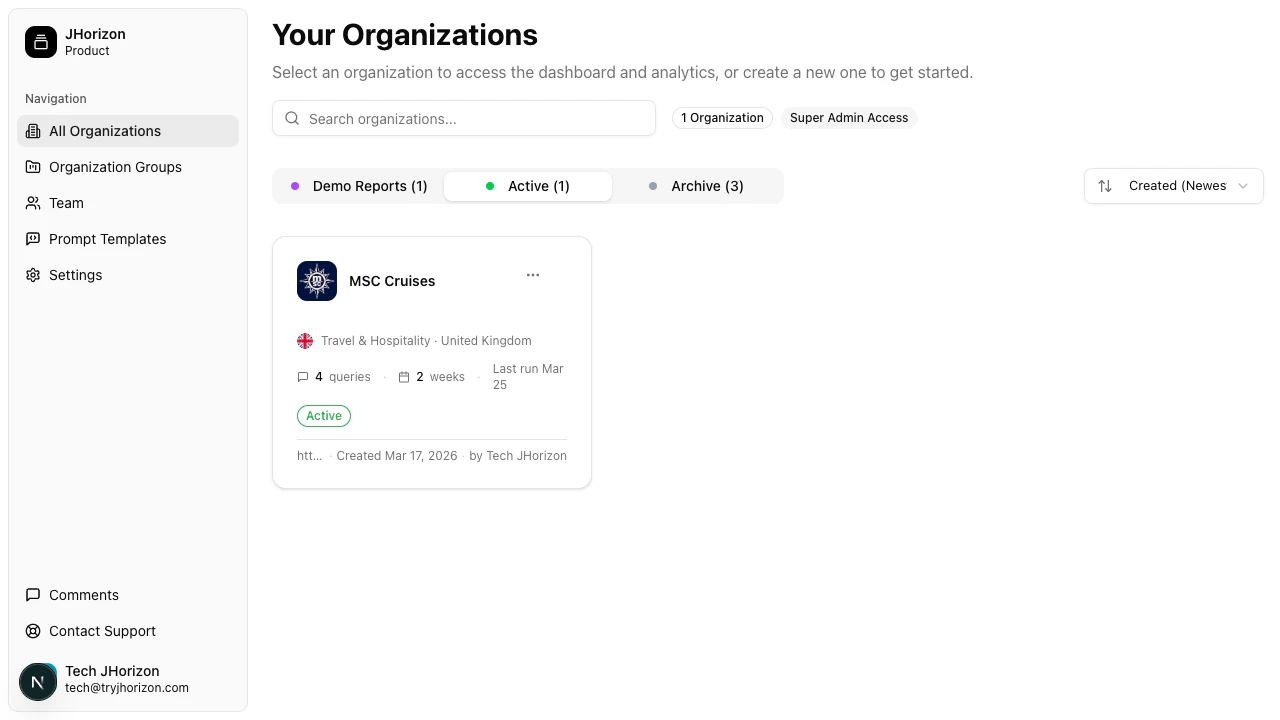
## Organization card
Each organization appears as a card in your organizations list. The card displays:
* **Brand name** — The name of the brand being monitored
* **Logo** — The brand's logo, pulled from the website or uploaded manually
* **Industry** — The industry category assigned during setup
* **Country** — The primary market for this brand
* **Analysis frequency** — How often J-Horizon runs analysis on this brand
* **Last run date** — When the most recent analysis completed
* **Status badge** — The current state of the organization
## Organization statuses
Every organization has one of three statuses:
| Status | Description |
| --------------- | ----------------------------------------------------------------------------------------------------------- |
| **Demo Report** | Pre-populated with sample data so you can explore the dashboard before running a live analysis. |
| **Active** | Live monitoring is enabled. J-Horizon runs analysis on the configured schedule and updates visibility data. |
| **Archive** | Monitoring is paused. Historical data is preserved but no new analysis runs. |
## Next steps
Set up a new brand for AI visibility monitoring.
Sort, filter, group, and change the status of your organizations.
## Company and organization hierarchy
Your company is the top-level account in J-Horizon. A company contains one or more organizations, where each organization represents a different brand you want to track.
For example, a holding company with three product lines would create three separate organizations — one for each brand. Each organization has its own dashboard, tracked prompts, competitors, and visibility data.
## Organization card
Each organization appears as a card in your organizations list. The card displays:
* **Brand name** — The name of the brand being monitored
* **Logo** — The brand's logo, pulled from the website or uploaded manually
* **Industry** — The industry category assigned during setup
* **Country** — The primary market for this brand
* **Analysis frequency** — How often J-Horizon runs analysis on this brand
* **Last run date** — When the most recent analysis completed
* **Status badge** — The current state of the organization
## Organization statuses
Every organization has one of three statuses:
| Status | Description |
| --------------- | ----------------------------------------------------------------------------------------------------------- |
| **Demo Report** | Pre-populated with sample data so you can explore the dashboard before running a live analysis. |
| **Active** | Live monitoring is enabled. J-Horizon runs analysis on the configured schedule and updates visibility data. |
| **Archive** | Monitoring is paused. Historical data is preserved but no new analysis runs. |
## Next steps
Set up a new brand for AI visibility monitoring.
Sort, filter, group, and change the status of your organizations.