> ## Documentation Index
> Fetch the complete documentation index at: https://knowledge.tryjhorizon.com/llms.txt
> Use this file to discover all available pages before exploring further.
# Sentiment analysis
> Review text-chunk level sentiment data for how AI search engines describe your brand.
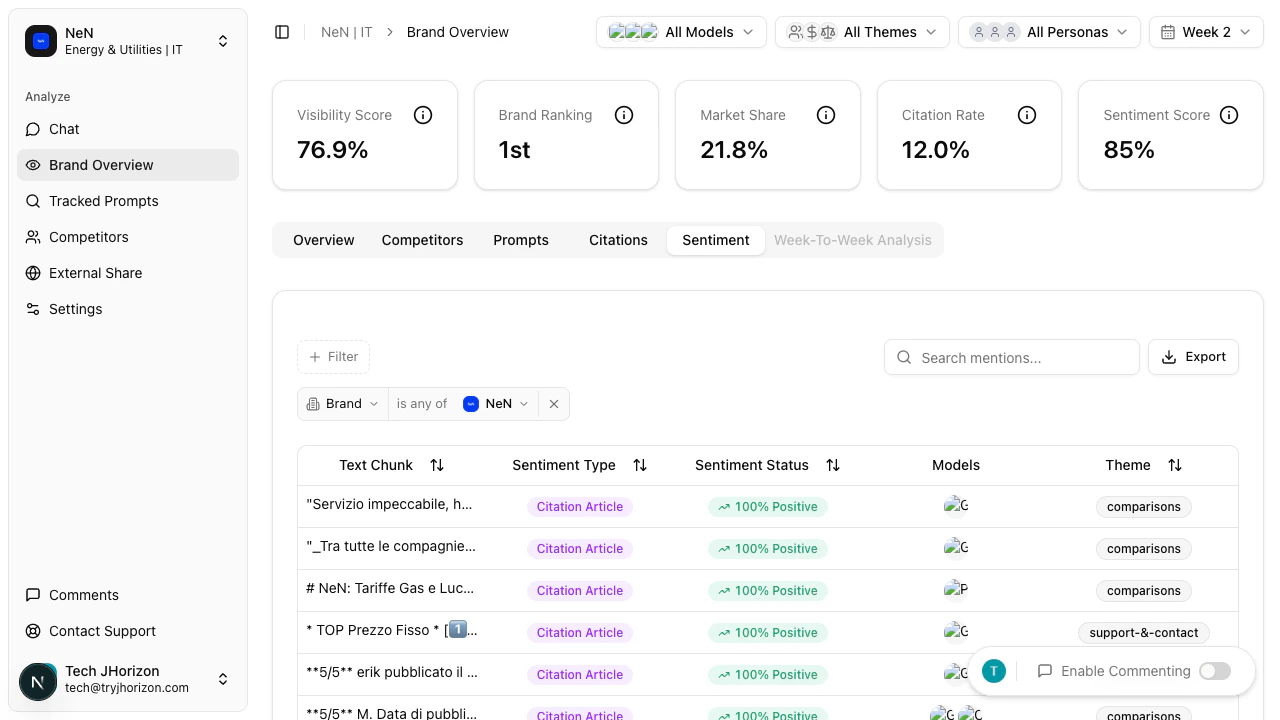
The **Sentiment** tab provides granular, text-chunk level sentiment analysis of AI-generated responses about your brand.
 ## How sentiment analysis works
Switch to the **Sentiment** tab on the dashboard to view individual text chunks extracted from AI-generated responses. Each chunk represents a specific passage where an AI search engine discusses your brand or a competitor.
Each text chunk displays:
* **AI-generated text** — the actual passage from the AI response
* **Sentiment status** — classified as positive, negative, or neutral
* **Brand reference** — which brand the text chunk discusses
## Filtering by brand
Use the brand filter to focus on a specific competitor or your own brand. This narrows the results to only show text chunks that reference the selected brand.
## Interpreting results
Use sentiment data to understand how AI search engines perceive and describe your brand to users. Look for patterns in the language AI uses, recurring themes in negative sentiment, and areas where your brand is consistently described positively.
If all results show the same sentiment, brand perception may be uniform across AI platforms. Consider expanding your tracked prompts or adjusting filters to surface more varied data.
## Related pages
* [Metrics reference](/reference/metrics) — sentiment score definition
* [Customer personas](/organizations/personas) — configure persona filters
## How sentiment analysis works
Switch to the **Sentiment** tab on the dashboard to view individual text chunks extracted from AI-generated responses. Each chunk represents a specific passage where an AI search engine discusses your brand or a competitor.
Each text chunk displays:
* **AI-generated text** — the actual passage from the AI response
* **Sentiment status** — classified as positive, negative, or neutral
* **Brand reference** — which brand the text chunk discusses
## Filtering by brand
Use the brand filter to focus on a specific competitor or your own brand. This narrows the results to only show text chunks that reference the selected brand.
## Interpreting results
Use sentiment data to understand how AI search engines perceive and describe your brand to users. Look for patterns in the language AI uses, recurring themes in negative sentiment, and areas where your brand is consistently described positively.
If all results show the same sentiment, brand perception may be uniform across AI platforms. Consider expanding your tracked prompts or adjusting filters to surface more varied data.
## Related pages
* [Metrics reference](/reference/metrics) — sentiment score definition
* [Customer personas](/organizations/personas) — configure persona filters