> ## Documentation Index
> Fetch the complete documentation index at: https://knowledge.tryjhorizon.com/llms.txt
> Use this file to discover all available pages before exploring further.
# Prompt performance
> Analyze how your brand performs across tracked prompts grouped by theme.
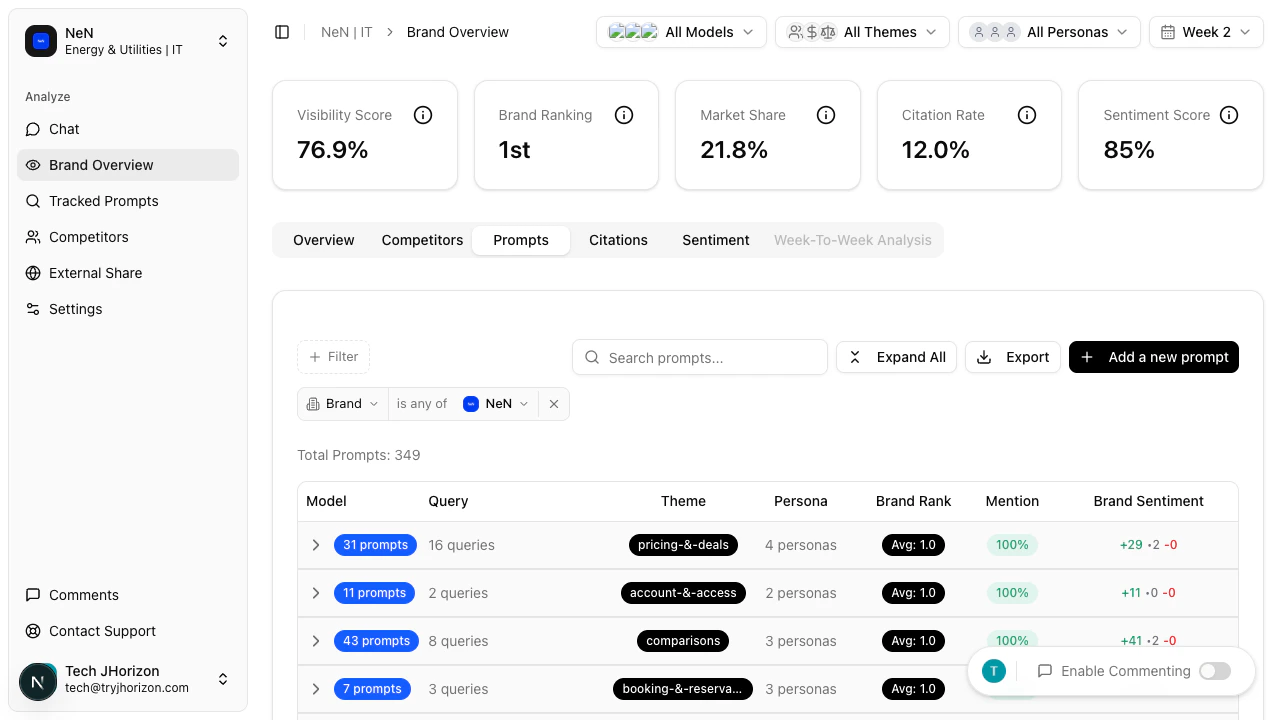
The **Prompts** tab shows how your brand performs across tracked prompts, organized by theme.
 ## Theme groups
Switch to the **Prompts** tab on the dashboard to see prompts grouped into the following themes. Each theme row is expandable — click a theme to reveal the individual prompts within that group and their per-prompt metrics.
* **How-To Guides** — instructional and tutorial-style prompts
* **Pricing & Deals** — prompts related to cost, pricing, and promotions
* **Comparisons** — prompts that compare brands or products
* **Booking & Reservations** — prompts about booking, scheduling, and reservations
* **Reviews & Opinions** — prompts seeking recommendations or reviews
* **Features & Amenities** — prompts about product capabilities and features
* **Account & Access** — prompts related to account management and access
* **Support & Contact** — prompts about customer support and contact information
## Metrics per prompt
Each prompt displays three metrics:
| Metric | Description |
| ---------------- | ------------------------------------------------------------------- |
| **Brand Rank** | Your brand's position in AI responses for that prompt |
| **Mention Rate** | How often your brand is mentioned in responses to that prompt |
| **Sentiment** | The sentiment of AI-generated text about your brand for that prompt |
This tab displays performance for prompts your organization is already tracking. To add, remove, or manage tracked prompts, see [Tracked prompts](/tracked-prompts/overview).
## Related pages
* [Metrics reference](/reference/metrics) — definitions for Brand Rank, Mention Rate, and Sentiment
* [Tracked prompts](/tracked-prompts/overview) — manage and add tracked prompts
## Theme groups
Switch to the **Prompts** tab on the dashboard to see prompts grouped into the following themes. Each theme row is expandable — click a theme to reveal the individual prompts within that group and their per-prompt metrics.
* **How-To Guides** — instructional and tutorial-style prompts
* **Pricing & Deals** — prompts related to cost, pricing, and promotions
* **Comparisons** — prompts that compare brands or products
* **Booking & Reservations** — prompts about booking, scheduling, and reservations
* **Reviews & Opinions** — prompts seeking recommendations or reviews
* **Features & Amenities** — prompts about product capabilities and features
* **Account & Access** — prompts related to account management and access
* **Support & Contact** — prompts about customer support and contact information
## Metrics per prompt
Each prompt displays three metrics:
| Metric | Description |
| ---------------- | ------------------------------------------------------------------- |
| **Brand Rank** | Your brand's position in AI responses for that prompt |
| **Mention Rate** | How often your brand is mentioned in responses to that prompt |
| **Sentiment** | The sentiment of AI-generated text about your brand for that prompt |
This tab displays performance for prompts your organization is already tracking. To add, remove, or manage tracked prompts, see [Tracked prompts](/tracked-prompts/overview).
## Related pages
* [Metrics reference](/reference/metrics) — definitions for Brand Rank, Mention Rate, and Sentiment
* [Tracked prompts](/tracked-prompts/overview) — manage and add tracked prompts